Benchmarking rgbio Performance
benchmarks.RmdBenchmarking rgbio Performance
Benchmark Setup
To evaluate real-world performance, we downloaded 17 archaeal type
strain assemblies from the order “Methanococcales” directly from NCBI
using the datasets command-line tool. These represent
real-world GenBank files with varying sizes and complexity.
#> The Benchmark was run on 2026-05-27 using rgbio version 0.4.0Data Download Command
# Download 17 archaeal type strain assemblies in GenBank format
datasets download genome taxon "methanococcales" \
  --from-type \
  --reference \
  --assembly-source RefSeq \
  --include gbff \
  --filename methanococcales_type_strains.zip --dehydrated && \
  unzip methanococcales_type_strains.zip && \
  datasets rehydrate --directory .
Packages Tested
We compared rgbio against three other popular GenBank
reading packages:
library(bench)
library(dplyr)
library(ggplot2)

# Packages being benchmarked
library(rgbio)      # High-performance GenBank I/O using Rust gb-io crate
library(read.gb)    # Specifically made for reading gb files
library(geneviewer) # Has a function to read gb files
library(genbankr) # Traditional Bioconductor GenBank reader. Only available up to Bioconductor version: 3.16 ≙ R version 4.2-
rgbio: Our Rust-powered package with two output
formats (
tidyandbioconductor) - geneviewer: A visualization-focused package with GenBank reading capabilities
- genbankr: The traditional Bioconductor solution for GenBank parsing
- read.gb: A dedicated GenBank file reader
Running the Benchmarks
# Set up test data paths
gbk_dir <- "./ncbi_dataset/data"
gbk_files <- list.files(gbk_dir, pattern = "\\.gbff$", recursive = TRUE, full.names = TRUE)

# Define reader functions for consistent testing
readers <- list(
    "rgbio::read_gbk(format = 'tidy')" = function(file) {
        tryCatch({
            rgbio::read_gbk(file, format = "tidy")
        }, error = function(e) {
            message("rgbio (tidy) failed on ", file, ": ", e$message)
            return(NULL)
        })
    },
    "rgbio::read_gbk(format = 'bioconductor')" = function(file) {
        tryCatch({
            rgbio::read_gbk(file, format = "bioconductor")
        }, error = function(e) {
            message("rgbio (bioconductor) failed on ", file, ": ", e$message)
            return(NULL)
        })
    },
    "rgbio::read_gbk(format = 'base')" = function(file) {
        tryCatch({
            rgbio::read_gbk(file, format = "base")
        }, error = function(e) {
            message("rgbio (base) failed on ", file, ": ", e$message)
            return(NULL)
        })
    },
    "rgbio::read_gbk(format = 'tidy', validate = FALSE)" = function(file) {
        tryCatch({
            rgbio::read_gbk(file, format = "tidy", validate = FALSE)
        }, error = function(e) {
            message("rgbio (tidy) failed on ", file, ": ", e$message)
            return(NULL)
        })
    },
    "rgbio::read_gbk(format = 'bioconductor', validate = FALSE)" = function(file) {
        tryCatch({
            rgbio::read_gbk(file, format = "bioconductor", validate = FALSE)
        }, error = function(e) {
            message("rgbio (bioconductor) failed on ", file, ": ", e$message)
            return(NULL)
        })
    },
    "rgbio::read_gbk(format = 'base', validate = FALSE)" = function(file) {
        tryCatch({
            rgbio::read_gbk(file, format = "base", validate = FALSE)
        }, error = function(e) {
            message("rgbio (base) failed on ", file, ": ", e$message)
            return(NULL)
        })
    },
    "geneviewer::read_gbk()" = function(file) {
        tryCatch({
            geneviewer::read_gbk(file)
        }, error = function(e) {
            message("geneviewer failed on ", file, ": ", e$message)
            return(NULL)
        })
    },
    "genbankr::readGenBank()" = function(file) {
        tryCatch({
            genbankr::readGenBank(file)
        }, error = function(e) {
            message("genbankr failed on ", file, ": ", e$message)
            return(NULL)
        })
    }
)
We use the bench package to get accurate timing
measurements, testing each parser on every file exactly once to simulate
real-world usage patterns.
# Run comprehensive benchmarks across all file × reader combinations
benchmark_results <- press(
    file = gbk_files,
    reader = names(readers),
    {
        result <- bench::mark(
            result = readers[[reader]](file),
            iterations = 1,
            check = FALSE
        )
    }
)
To benchmark the writing, we pre-read each file once per
rgbio format (without benchmarking), store those parsed
objects, and then benchmark only the write step.
# Pre-read objects once (no benchmarking) for each file × rgbio format
write_cache_grid <- expand.grid(
    file = gbk_files,
    write_format = c("tidy", "bioconductor"),
    stringsAsFactors = FALSE
)

write_cache_read_once <- function(file, write_format) {
    tryCatch({
        rgbio::read_gbk(file, format = write_format)
    }, error = function(e) {
        message("rgbio ", write_format, " pre-read failed on ", file, ": ", e$message)
        return(NULL)
    })
}

rgbio_cached_reads <- write_cache_grid %>%
    rowwise() %>%
    mutate(parsed_obj = list(write_cache_read_once(file, write_format))) %>%
    ungroup()

# Benchmark write phase only, reusing cached parsed objects
write_benchmark_results <- press(
    row_id = seq_len(nrow(rgbio_cached_reads)),
    {
        file <- rgbio_cached_reads$file[[row_id]]
        write_format <- rgbio_cached_reads$write_format[[row_id]]
        obj <- rgbio_cached_reads$parsed_obj[[row_id]]

        result <- bench::mark(
            result = {
                tmp_file <- tempfile(pattern = "rgbio_write_benchmark_", fileext = ".gb")

                tryCatch({
                    if (is.null(obj)) {
                        stop("cached read object is NULL")
                    }

                    if (write_format == "tidy") {
                        seqs <- setNames(as.character(obj$sequences$sequence), obj$sequences$record_id)
                        rgbio::write_gbk(
                            file = tmp_file,
                            sequences = seqs,
                            features = obj$features,
                            metadata = obj$metadata
                        )
                    } else {
                        rgbio::write_gbk(
                            file = tmp_file,
                            sequences = obj$sequences,
                            features = obj$features,
                            metadata = obj$metadata
                        )
                    }
                }, error = function(e) {
                    message("rgbio ", write_format, " write failed on ", file, ": ", e$message)
                    return(FALSE)
                }, finally = {
                    unlink(tmp_file)
                })
            },
            iterations = 1,
            check = FALSE
        ) %>%
            mutate(
                file = file,
                write_format = write_format,
                operation = "write"
            )
    }
)

# Store write benchmark results for downstream processing
write_results <- write_benchmark_results
Processing Results
# Clean up results and add useful metadata
benchmark_df <- benchmark_results %>%
    mutate(
        file_id = as.numeric(factor(file)),
        file_name = dirname(file),
        file_size_mb = file.info(file)$size / (1024^2),
        success = !is.na(median),
        time_ms = ifelse(success, as.numeric(median) * 1000, NA),
        memory_mb = ifelse(success, as.numeric(gsub("[^0-9.]", "", mem_alloc)), NA)
    ) %>%
    select(reader, file_id, file_name, file_size_mb, success, time_ms, memory_mb)

# Parse write benchmark results with matching metadata fields
write_benchmark_df <- write_results %>%
    mutate(
        file_id = as.numeric(factor(file)),
        file_name = dirname(file),
        file_size_mb = file.info(file)$size / (1024^2),
        success = !is.na(median),
        time_ms = ifelse(success, as.numeric(median) * 1000, NA),
        memory_mb = ifelse(success, as.numeric(gsub("[^0-9.]", "", mem_alloc)), NA)
    ) %>%
    select(write_format, operation, file_id, file_name, file_size_mb, success, time_ms, memory_mb)
Results
Performance Visualization
p1 <- ggplot(benchmark_df, aes(x = factor(reader, levels = names(readers)), y = time_ms, fill = reader)) +
    geom_violin(alpha = 0.7) +
    geom_boxplot(width = 0.2, alpha = 0.8) +
    scale_y_log10() +
    labs(
        title = "Time Reading GenBank Files (lower is better)",
        y = "Time (ms, log scale)",
        subtitle = paste("Based on",
                        benchmark_df %>%
                        filter(success) %>%
                        group_by(reader) %>%
                        summarise(n = n()) %>%
                        pull(n) %>%
                        min(),
                        "files per parser")
    ) +
    theme_minimal() +
    theme(
        axis.text.x = element_text(angle = 45, hjust = 1),
        legend.position = "none"
    ) +
    xlab("Parsing function")

p1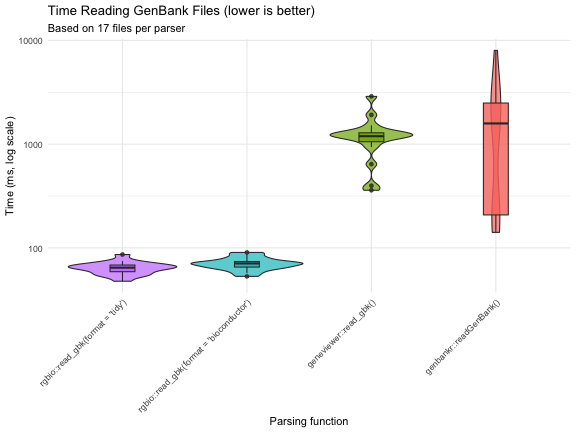
Summary Statistics
# Calculate performance summary with speedup factors
summary_stats <- benchmark_df %>%
    group_by(reader) %>%
    summarise(
        n_files = n(),
        median_time_ms = round(median(time_ms, na.rm = TRUE), 1),
        mean_time_ms = round(mean(time_ms, na.rm = TRUE), 1),
        median_memory_mb = round(median(memory_mb, na.rm = TRUE), 1),
        .groups = "drop"
    ) %>%
    arrange(factor(reader, levels = names(readers))) %>%
    mutate(
        max_time = max(median_time_ms),
        speedup = case_when(
            median_time_ms == max_time ~ "baseline",
            TRUE ~ paste0(round(max_time / median_time_ms, 1), "x")
        )
    ) %>%
    select(reader, speedup, median_time_ms, mean_time_ms, median_memory_mb, n_files)

knitr::kable(summary_stats,
             col.names = c("Parser", "Speed vs Slowest", "Median Time (ms)",
                          "Mean Time (ms)", "Median Memory (MB)", "Files Tested"),
caption = "Performance comparison summary")| Parser | Speed vs Slowest | Median Time (ms) | Mean Time (ms) | Median Memory (MB) | Files Tested |
|---|---|---|---|---|---|
| rgbio::read_gbk(format = ‘tidy’) | 45.3x | 42.2 | 42.5 | 4.4 | 17 |
| rgbio::read_gbk(format = ‘bioconductor’) | 38.2x | 50.1 | 48.8 | 6.2 | 17 |
| rgbio::read_gbk(format = ‘base’) | 45.4x | 42.1 | 41.6 | 4.3 | 17 |
| rgbio::read_gbk(format = ‘tidy’, validate = FALSE) | 44.8x | 42.7 | 44.2 | 5.0 | 17 |
| rgbio::read_gbk(format = ‘bioconductor’, validate = FALSE) | 37.2x | 51.4 | 68.3 | 5.0 | 17 |
| rgbio::read_gbk(format = ‘base’, validate = FALSE) | 45.6x | 41.9 | 42.5 | 4.1 | 17 |
| geneviewer::read_gbk() | 1.5x | 1261.0 | 1387.9 | 1.5 | 17 |
| genbankr::readGenBank() | baseline | 1912.1 | 1688.6 | 38.7 | 17 |
Key Findings
The benchmarks reveal several important insights:
-
rgbio is significantly faster: Both
rgbioformats substantially outperform traditional R-based parsers -
Consistent performance:
rgbioshows reliable performance across different file sizes and complexities
-
Format flexibility: The
tidyformat offers the best performance, whilebioconductorformat provides compatibility with existing workflows -
Memory efficiency:
rgbiomaintains competitive memory usage while delivering superior speed
Technical Details
sessionInfo()
#> R version 4.2.3 (2023-03-15)
#> Platform: aarch64-apple-darwin20 (64-bit)
#> Running under: macOS 15.7.7
#>
#> Matrix products: default
#> BLAS:   /Library/Frameworks/R.framework/Versions/4.2-arm64/Resources/lib/libRblas.0.dylib
#> LAPACK: /Library/Frameworks/R.framework/Versions/4.2-arm64/Resources/lib/libRlapack.dylib
#>
#> locale:
#> [1] C/UTF-8/C/C/C/C
#>
#> attached base packages:
#> [1] stats     graphics  grDevices utils     datasets  methods   base
#>
#> other attached packages:
#> [1] genbankr_1.26.0   geneviewer_0.1.11 read.gb_2.2       rgbio_0.4.0
#> [5] ggplot2_4.0.3     dplyr_1.2.1       bench_1.1.4
#>
#> loaded via a namespace (and not attached):
#>  [1] bitops_1.0-9                matrixStats_1.5.0
#>  [3] fontawesome_0.5.3           bit64_4.8.2
#>  [5] filelock_1.0.3              RColorBrewer_1.1-3
#>  [7] progress_1.2.3              httr_1.4.8
#>  [9] GenomeInfoDb_1.34.9         tools_4.2.3
#> [11] utf8_1.2.6                  R6_2.6.1
#> [13] otel_0.2.0                  DBI_1.3.0
#> [15] BiocGenerics_0.44.0         withr_3.0.2
#> [17] tidyselect_1.2.1            prettyunits_1.2.0
#> [19] bit_4.6.0                   curl_7.1.0
#> [21] compiler_4.2.3              cli_3.6.6
#> [23] Biobase_2.58.0              xml2_1.5.2
#> [25] DelayedArray_0.24.0         rtracklayer_1.58.0
#> [27] scales_1.4.0                S7_0.2.2
#> [29] rappdirs_0.3.4              stringr_1.6.0
#> [31] digest_0.6.39               Rsamtools_2.14.0
#> [33] rentrez_1.2.4               XVector_0.38.0
#> [35] pkgconfig_2.0.3             htmltools_0.5.9
#> [37] MatrixGenerics_1.10.0       dbplyr_2.5.2
#> [39] fastmap_1.2.0               BSgenome_1.66.3
#> [41] htmlwidgets_1.6.4           rlang_1.2.0
#> [43] RSQLite_3.52.0              BiocIO_1.8.0
#> [45] farver_2.1.2                generics_0.1.4
#> [47] jsonlite_2.0.0              BiocParallel_1.32.6
#> [49] VariantAnnotation_1.44.1    RCurl_1.98-1.18
#> [51] magrittr_2.0.5              GenomeInfoDbData_1.2.9
#> [53] Matrix_1.5-3                Rcpp_1.1.1-1.1
#> [55] S4Vectors_0.36.2            lifecycle_1.0.5
#> [57] stringi_1.8.7               yaml_2.3.12
#> [59] SummarizedExperiment_1.28.0 zlibbioc_1.44.0
#> [61] BiocFileCache_2.6.1         grid_4.2.3
#> [63] blob_1.3.0                  parallel_4.2.3
#> [65] crayon_1.5.3                profmem_0.7.0
#> [67] lattice_0.22-9              Biostrings_2.66.0
#> [69] GenomicFeatures_1.50.4      hms_1.1.4
#> [71] KEGGREST_1.38.0             knitr_1.51
#> [73] pillar_1.11.1               GenomicRanges_1.50.2
#> [75] rjson_0.2.23                codetools_0.2-20
#> [77] biomaRt_2.54.1              stats4_4.2.3
#> [79] XML_3.99-0.23               glue_1.8.1
#> [81] evaluate_1.0.5              png_0.1-9
#> [83] vctrs_0.7.3                 gtable_0.3.6
#> [85] purrr_1.2.2                 tidyr_1.3.2
#> [87] cachem_1.1.0                xfun_0.57
#> [89] restfulr_0.0.16             tibble_3.3.1
#> [91] GenomicAlignments_1.34.1    AnnotationDbi_1.60.2
#> [93] memoise_2.0.1               IRanges_2.32.0
Conclusion
These benchmarks demonstrate that rgbio provides
substantial performance improvements for GenBank file parsing in R,
making it an excellent choice for both interactive analysis and
large-scale genomic data processing workflows. The Rust-powered backend
delivers the speed improvements while maintaining the familiar R
interface that researchers expect.
For the most up-to-date benchmarks and methodology, visit the rgbio GitHub repository.